100 Blocks a Day, quantified
September 23, 2020
This quarter, I want to do several “one-off” projects; this is the first of them. You can find the code for this project here.
This project is primarily inspired by “100 Blocks a Day” idea put forth by Tim Urban. The basic idea is that we are awake for roughly 1,000 minutes a day; thus, you can frame one day as consisting of 100 10-minute blocks. With that frame in mind, we can pose lots of questions…like how many blocks do I have left? How many more blocks will I spend with family, will I spend scrolling social media, will I spend in deep conversations with friends, will I spend deeply immersed in stuff that I care about?
As an experiment, I want to build upon this idea by tracking what I’m doing each 10-minute “block” of the day. After building up some blocks, (say, at the end of the day) during my daily review, I can review my ~100 blocks for the day, and see where my time really went. Same thing could be done for months, years, and lifetimes. I think that this will benefit me two ways:
- Objective view of self. It’s hard to really know how I’m doing in life, and reflect and improve on that, without having hard data on what I’m doing.
- Increased mindfulness. The 10-minute reminders not only passively track me, but also double as a mindfulness reminder. If I’ve been mindlessly scrolling on Reddit or perseverating over some insignificant worry, the reminder serves as a nudge to say, “Hey, a block of time just went by,” and gently redirect my attention back to more fulfilling things.
Part 1: Polling myself every 10 minutes #
The first component is a mechanism to poll myself every 10 minutes. But first, I had to ask myself a couple of questions to figure out how exactly I want to make this polling mechanism:
How much granularity to have in distinguishing activities? #
Well, to answer that, I have to ask “What do I want to get out of this?” Well, one major thing is I want to see how much contiguous time I spend in Deep Work. Also, I would like to see how much time I’m spending with my family, my girlfriend, my exercise routine, etc. So really, it doesn’t need to be a detailed log – can just be broad categories, such as Projects, Writing Social Time, Eating, Exercise, and Sleeping (for my own sanity, I will not be waking up every 10 minutes to track my sleep…I let Sleep Cycle take care of that for me.)
What platform to make the polling mechanism on? #
One option might be an iOS app – this feels like a bit overkill, though, because I really don’t need a custom user interface – I just need text inputs from myself at regular intervals. I want this polling to be as unintrusive as possible – a very simple click/tap or two every ten minutes, and I’m on my way. I’ve experimented with simply using the Reminders app and Google Sheets – however, this procedure is rather cumbersome, because the reminder doesn’t lead directly to the spreadsheet, and scrolling down and entering values manually in a spreadsheet is annoying. This procedure would take me around 40 seconds – which is essentially taking away nearly 10% of my time.
Given these constraints, Messenger bots seem to be a good platform – the front-end UI is already done for me, and I can simply program a bot to ask me “What are you doing?” every 10 minutes. I can even include nice features like Quick Replies, so I can supply input with one tap.
Building a Messenger bot #
First, I followed the instructions in https://developers.facebook.com/docs/messenger-platform/getting-started to set up the Facebook Page and starter code for the Messenger bot’s webhook, a Node.js server to which all messages from the user will be routed to and from which all bot replies are sent. I chose to deploy my webhook to Heroku.
I took the code from this sample Messenger app to start out, which defines the necessary routes for the webhook, providing some useful helpers to respond to user messages, use the Send API, etc.. . I modified the handleMessage function so that the initial message from the user starts a chain of repeating messages, 10 minutes apart, utilizing the setInterval JS function to schedule quick-replyable messages to the user. This makes following flow possible:
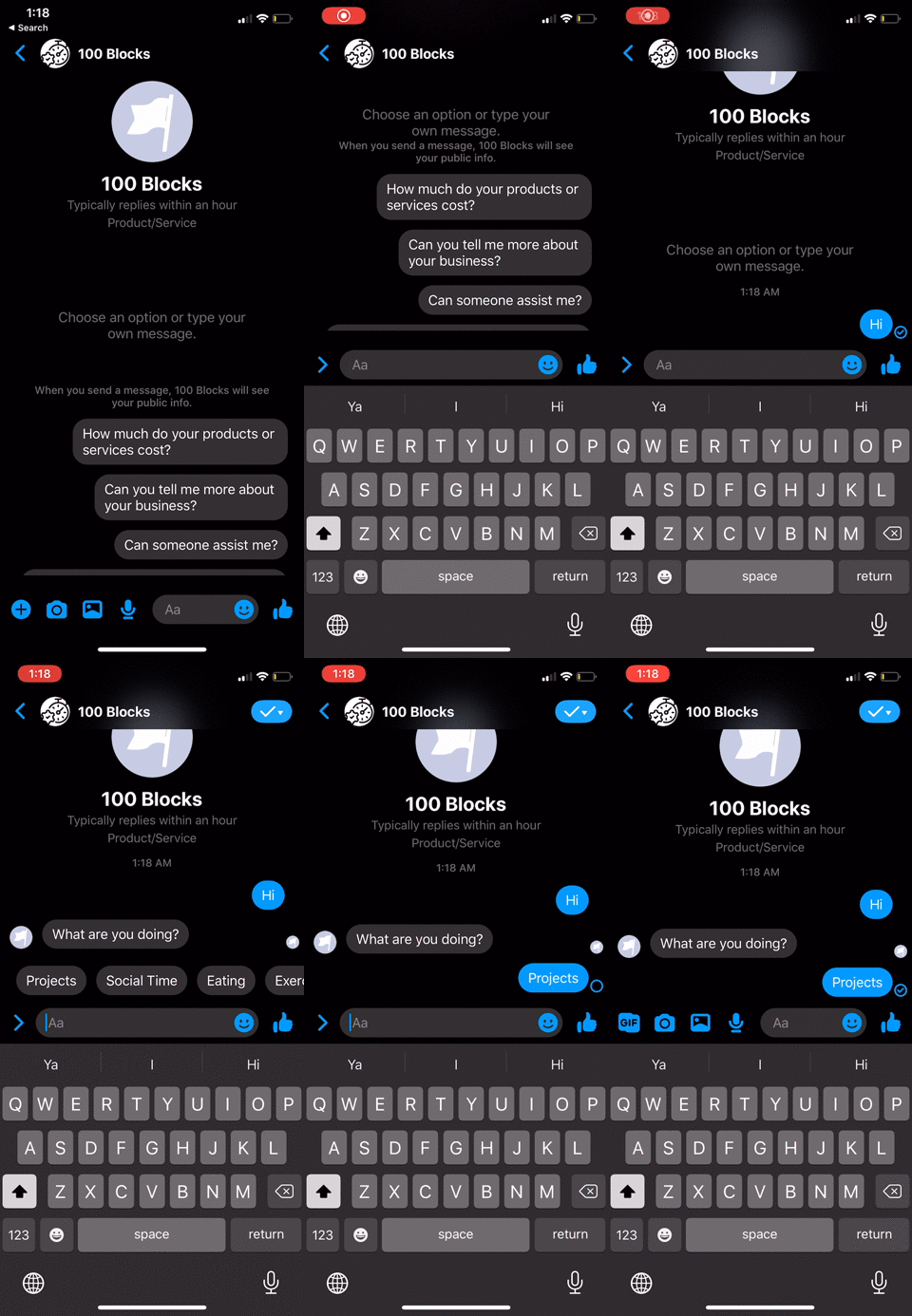
After receiving the activity input from the user, we have to store it somewhere. My database of choice is DynamoDB, as I’m familiar with the AWS SDK, and it’s quite easy to use. So I added the necessary AWS credentials as config vars in my Heroku app settings, and then created a new table in DynamoDB. For the table, I set the primary key as the recorded user activity (e.g. Projects, Reading, etc.), and the secondary index as time the user entered the input (in ISO format.) Using timestamp as a secondary index or sort key will enable me to efficiently filter by timestamp in the future – say, if I wanted to pull only the last day or week’s entries for a daily review.
I add a record to DynamoDB as such:
function addActivityToDatabase(activity) {
  const timestamp = new Date().toISOString();
  var params = {
    TableName : DYNAMODB_TABLE_NAME,
    Item: { activity, timestamp }
  };
  ddb.put(params, function(err, data) {
    if (err) console.log(err);
    else {
      console.log(`Successfully put data ${JSON.stringify(params.Item)} in DynamoDB!`)
      console.log(data);
    }
  });
}
So now that we have the tracking flow working and storing data, that brings us to the next section…
Part 2: Visualizing my time in daily review #
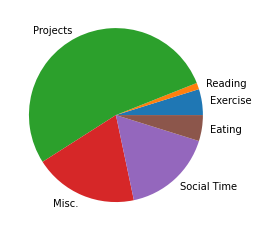
Now that we’ve collected all this data, it’s time to use it. I like to get a sense of what I accomplished at the end of the day – but often I feel like my finished task list doesn’t tell the full story. Moreover, I wrote some python scripts to show my time in “Blocks,” just as in the article:
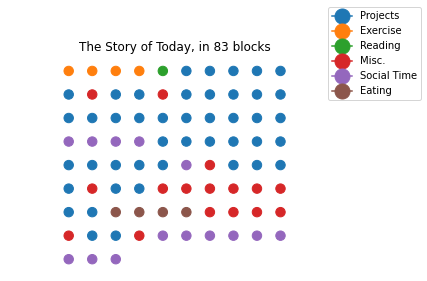
As well as in pie charts:
I’ll try using this system for the next few weeks, and see if any insight arises from it.